Problem
ChatGPT has a hidden toolkit that can be helpful to many users, yet it's rarely used.
Solution
Redesign ChatGPT's interface to help users learn about these hidden features.


Problem
ChatGPT has a hidden toolkit that can be helpful to many users, yet it's rarely used.
Solution
Redesign ChatGPT's interface to help users learn about these hidden features.


ChatGTP Redesign
ChatGTP Redesign
Helping users understand ChatGPT's under used toolkit
Note: This project will only cover the free version of Chat GPT from before March 2025
PROJECT DURATION
February 2025 - March 2025
SKILLS
UX Writing
Advanced Figma prototyping
UX Research & User Testing
CATAGORY
Redesign
100% of tested users did not know the toolkit existed or helped narrow down requests
USER QUOTES
"What does the Reason Mode do?"
"I didn't know Search Mode provided cited sources!"
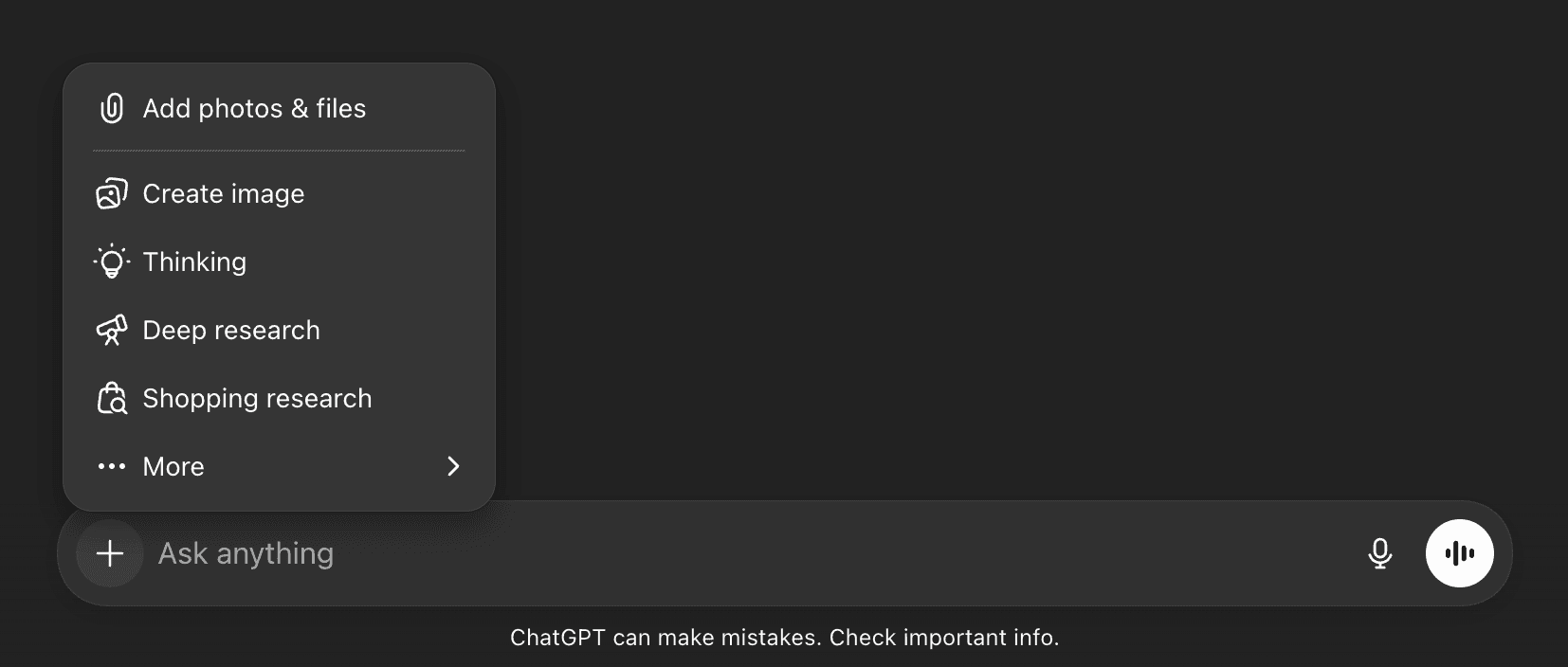
ChatGPT's hidden toolkit placement is bizarre. Instead of having its own dedicated spot, it's merged with other features such as photos
100%
Did not use the Toolkit
No user tested during interviews used the toolkit. When asked why, users said they were unaware.
100%
Think GPT gave false info
Complaints of the AI being asked a question and hallucinating without cited sources was a huge issue.
100%
Needed Citations
Users were unaware ChatGPT could cite sources and as many only used the default modal.
100%
Did not use the Toolkit
No user tested during interviews used the toolkit. When asked why, users said they were unaware.
100%
Think GPT gave false info
Complaints of the AI being asked a question and hallucinating without cited sources was a huge issue.
100%
Needed Citations
Users were unaware ChatGPT could cite sources and as many only used the default modal.
ChatGPT's toolkit was hidden from users, which why I decided:
To make GPT's toolkit visible
Concepts for the new layout that visually hi-lights the toolkit
MID FIDELITY
New layout was focused on drawing the eyes of the user to the toolkit.
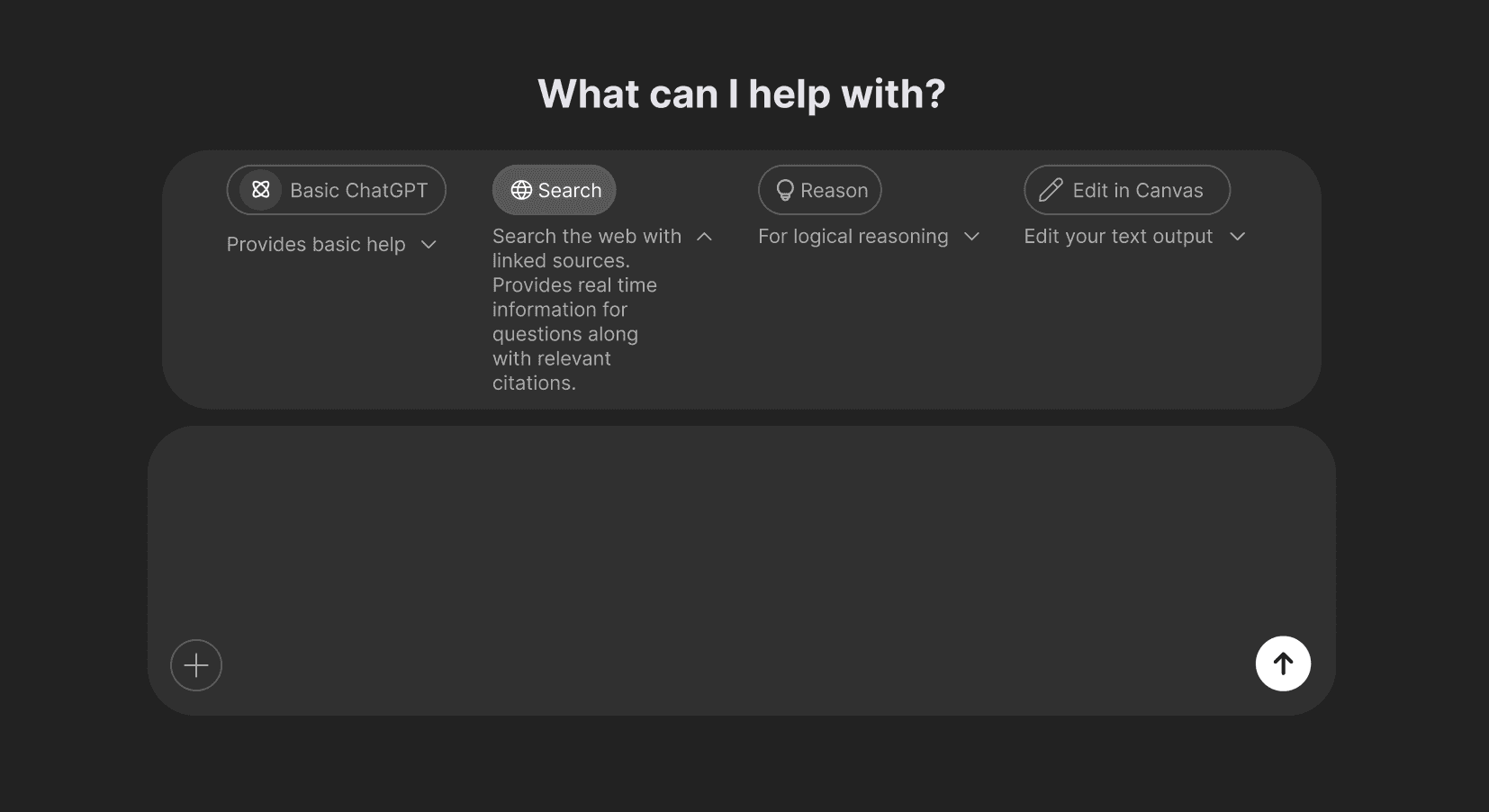
Mid fidelity attempt to create a visible toolkit with horizontal layout
User testing showed failure in both UI and UX writing
THE FLAWS
According to users, the greyscale UI made it hard for them to find the key interactions.
And even when features were selected, they failed to understand what they did.
60%
Complained of bad UI
Colors and text blended in too much with each other for users to see properly.
100%
Failed to use Search Mode
Users thought Search Mode "Google" and didn't use the drop down.
60%
Failed to use Reason Mode
Users failed to use drop down and did not understand what Reason Mode did.
A new UI to help guide users that is more colorful and easier to nagivate
UI KIT & BRAND DESIGN
Brighter colors were chosen to hi-light important features, easing the grey on grey UI of the original ChatGPT
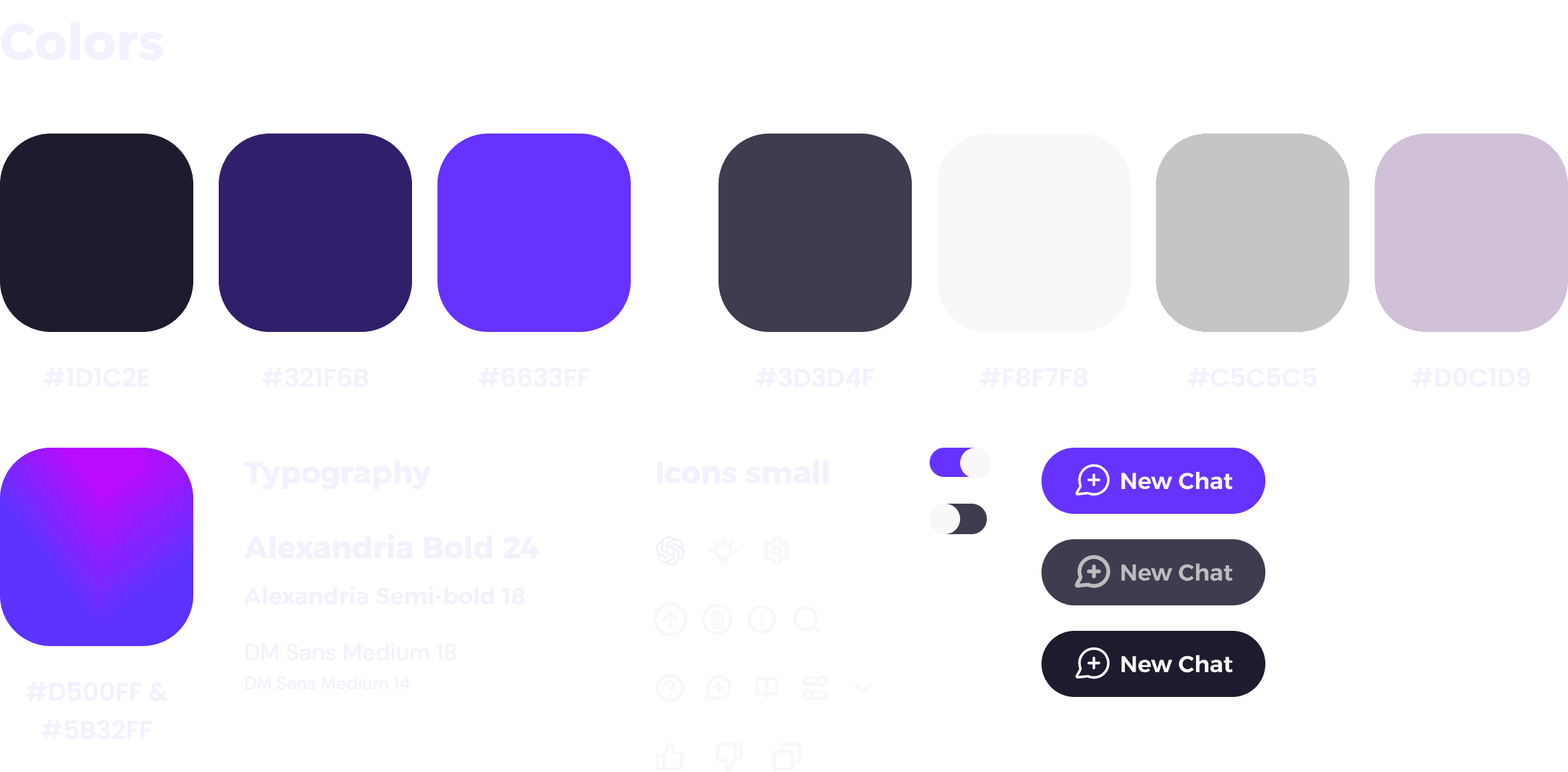
Renaming key features:
Search → Cite Sources
Reason → Think
RENAMING KEY FEATURES
SEARCH IS NOW CITE SOURCES
Search is now Cite Sources as a reference to academic citations. Users kept mentioning "cite sources" as a keyword in tests.
REASON IS NOW THINK MODE
Reason was renamed to Think because this feature mimics human thinking, thus users may relate the two concepts.
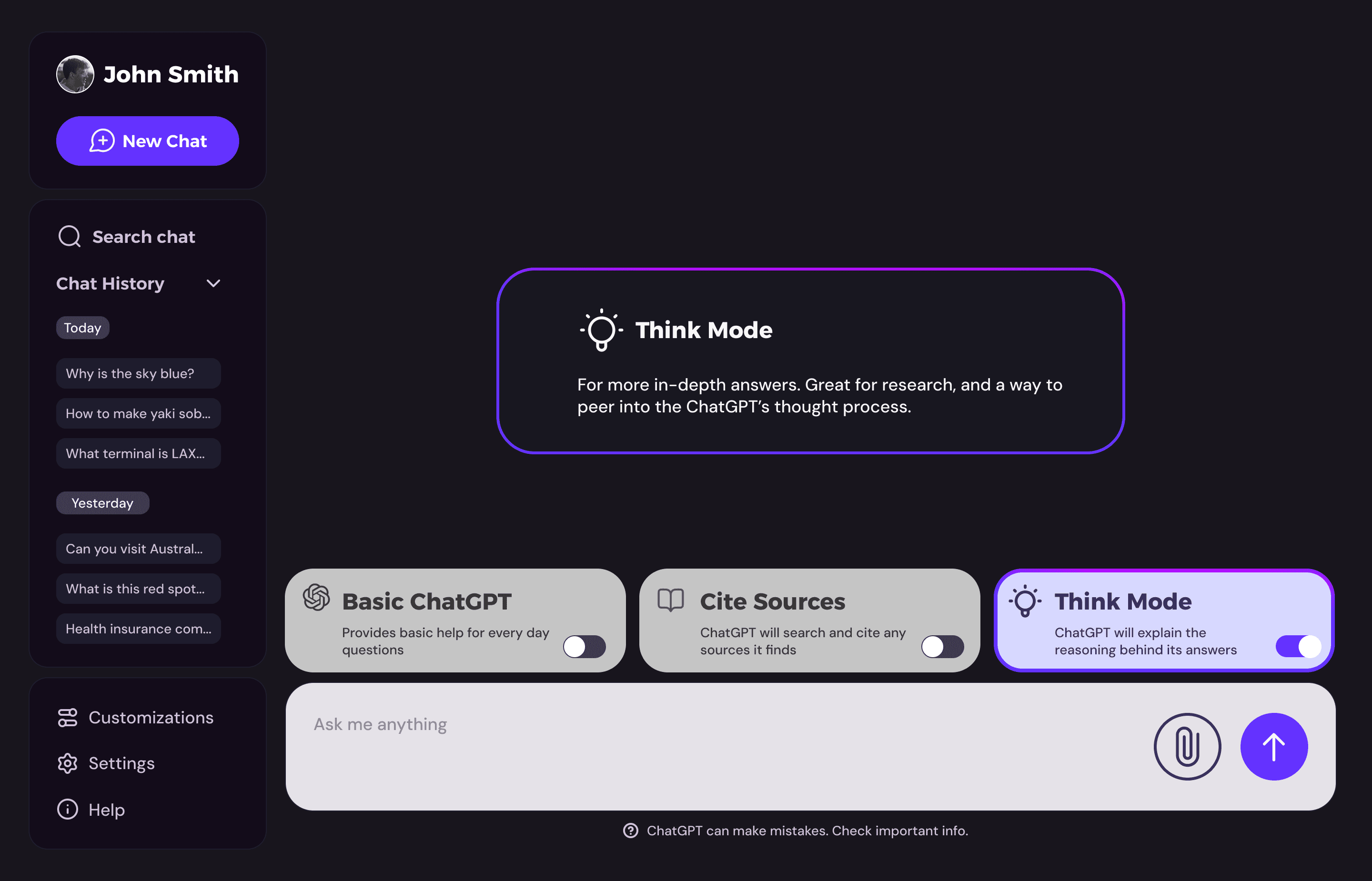
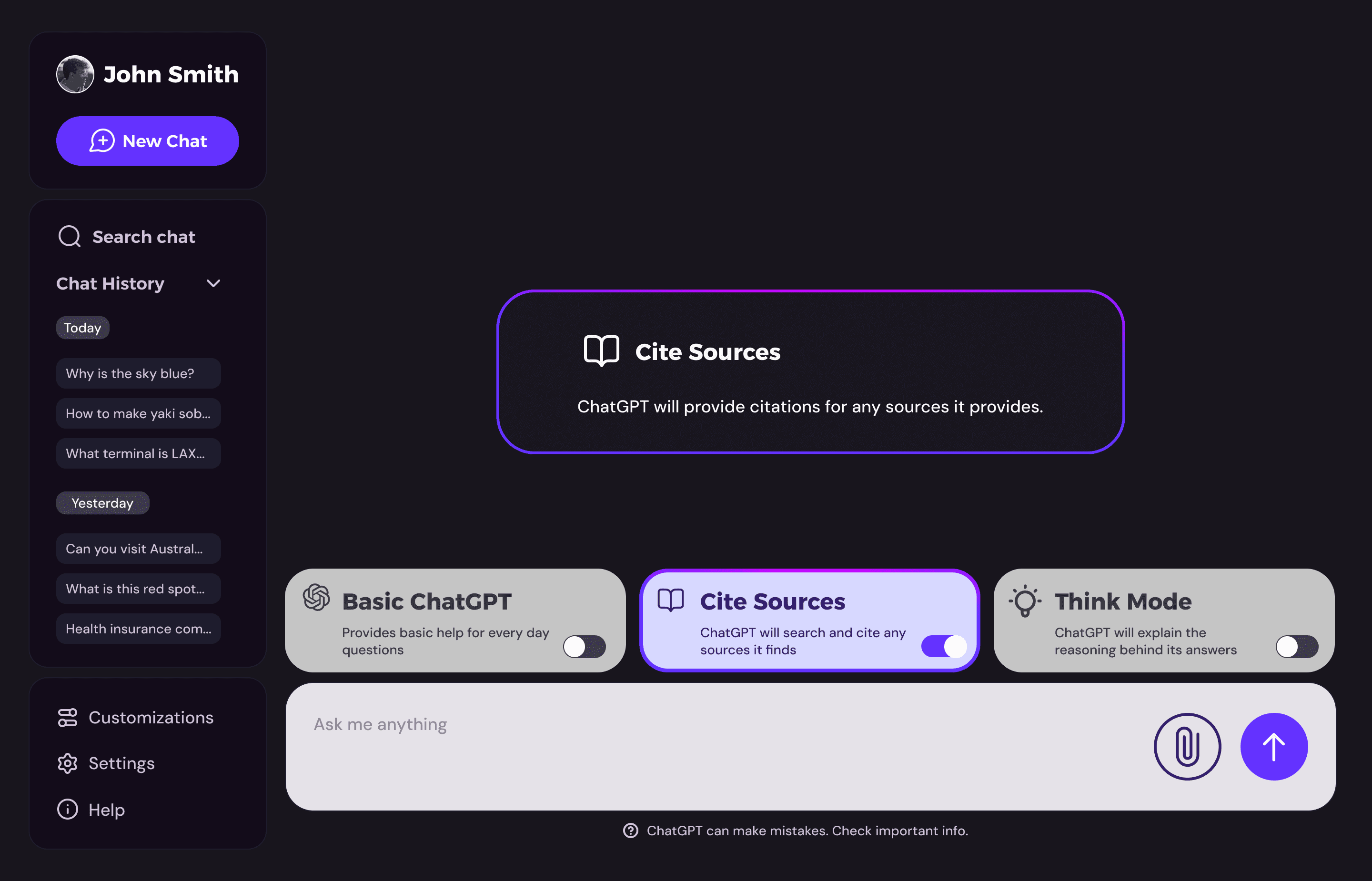
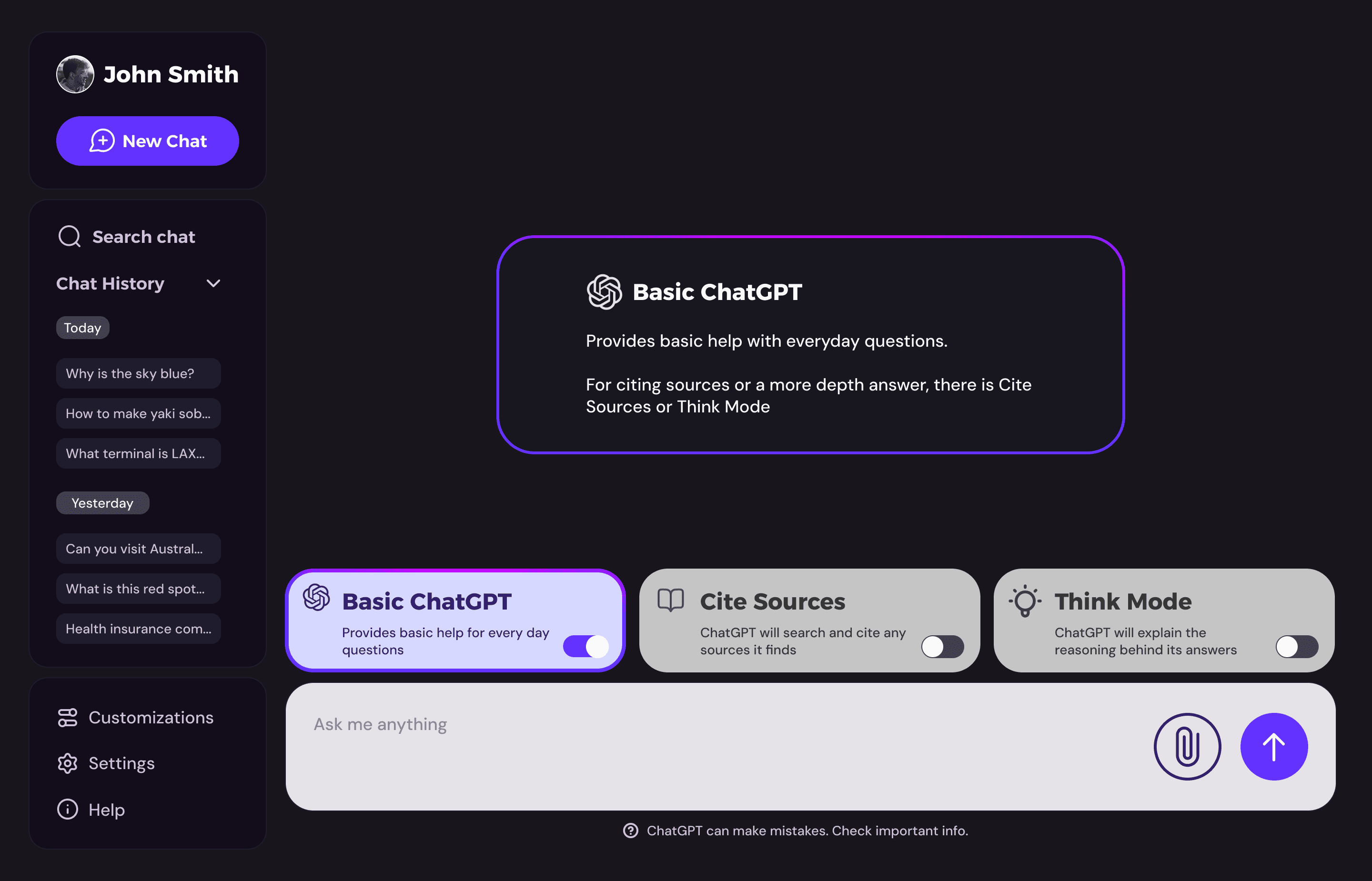
Colorful UI used to hi-light each AI tool and a popup for a more detailed explanation

Cite Sources explains to users how the AI will support its output with any sources it finds on the internet

Think Mode was the hardest to explain but it lets users get a more in-depth answer from the AI
Extra interaction to help readability
CHANGES TO THE UI WITH OUTPUT
Once ChatGPT outputs, the UI for the toolkit shrinks to give the user more room to read. If the user hovers over the button switches, they will grow to full size again.
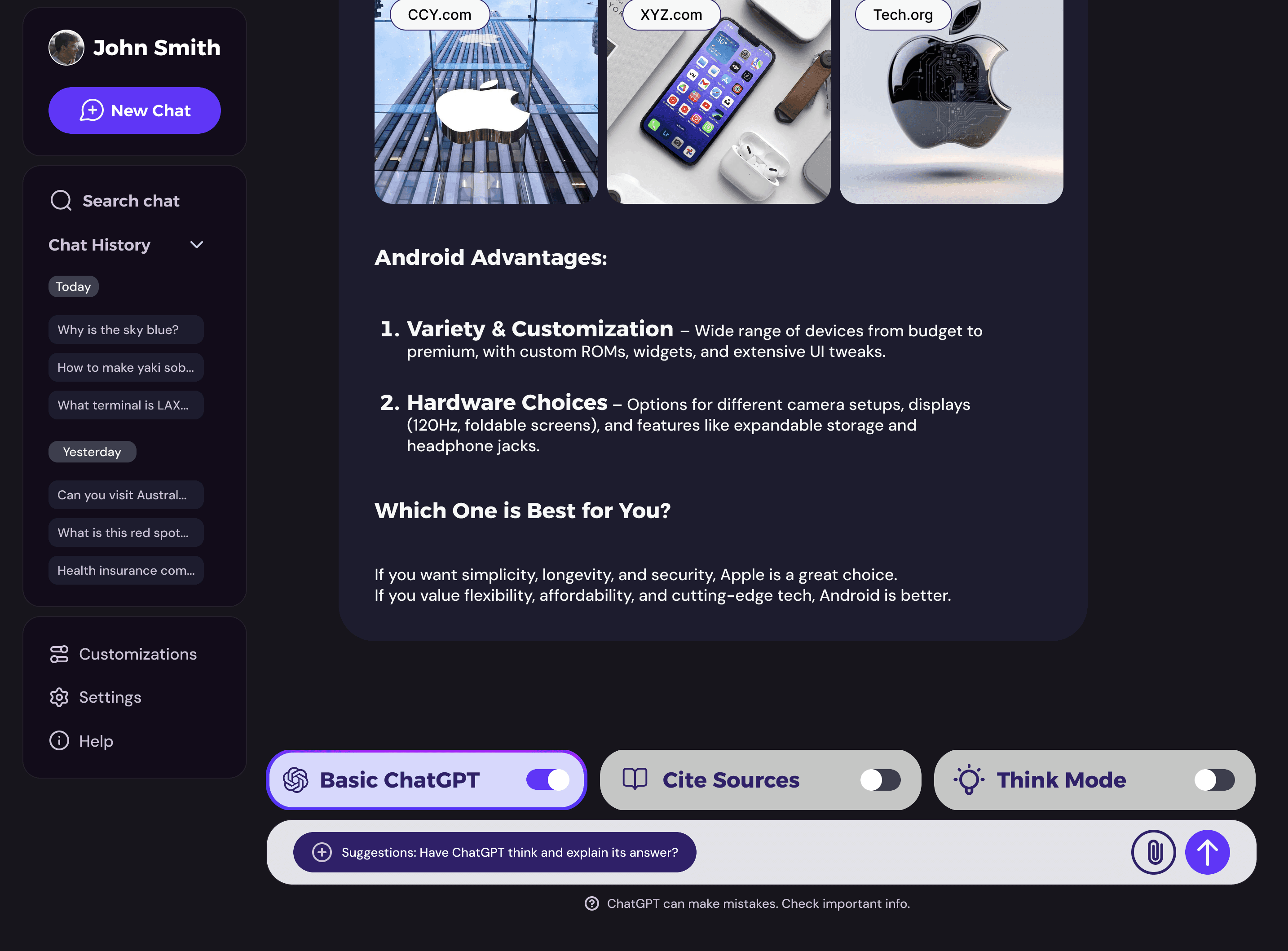
Think Mode was the hardest to explain but it lets users get a more in-depth answer from the AI
See the prototype
Check out my other works
CAMPUS
COLLECT
COMING
SOON...
Helping users understand ChatGPT's under used toolkit
Note: This project will only cover the free version of Chat GPT from before March 2025
PROJECT DURATION
February 2025 - March 2025
SKILLS
UX Writing
Advanced Figma prototyping
UX Research & User Testing
CATAGORY
Redesign
100% of tested users did not know the toolkit existed or helped narrow down requests
USER QUOTES
"What does the Reason Mode do?"
"I didn't know Search Mode provided cited sources!"

ChatGPT's hidden toolkit placement is bizarre. Instead of having its own dedicated spot, it's merged with other features such as photos
100%
Did not use the Toolkit
No user tested during interviews used the toolkit. When asked why, users said they were unaware.
100%
Think GPT gave false info
Complaints of the AI being asked a question and hallucinating without cited sources was a huge issue.
100%
Needed Citations
Users were unaware ChatGPT could cite sources and as many only used the default modal.
100%
Did not use the Toolkit
No user tested during interviews used the toolkit. When asked why, users said they were unaware.
100%
Think GPT gave false info
Complaints of the AI being asked a question and hallucinating without cited sources was a huge issue.
100%
Needed Citations
Users were unaware ChatGPT could cite sources and as many only used the default modal.
ChatGPT's toolkit was hidden from users, which why I decided:
To make GPT's toolkit visible
Concepts for the new layout that visually hi-lights the toolkit
MID FIDELITY
New layout was focused on drawing the eyes of the user to the toolkit.

Mid fidelity attempt to create a visible toolkit with horizontal layout
User testing showed failure in both UI and UX writing
THE FLAWS
According to users, the greyscale UI made it hard for them to find the key interactions.
And even when features were selected, they failed to understand what they did.
60%
Complained of bad UI
Colors and text blended in too much with each other for users to see properly.
100%
Failed to use Search Mode
Users thought Search Mode "Google" and didn't use the drop down.
60%
Failed to use Reason Mode
Users failed to use drop down and did not understand what Reason Mode did.
A new UI to help guide users that is more colorful and easier to nagivate
UI KIT & BRAND DESIGN
Brighter colors were chosen to hi-light important features, easing the grey on grey UI of the original ChatGPT

Renaming key features:
Search → Cite Sources
Reason → Think
RENAMING KEY FEATURES
SEARCH IS NOW CITE SOURCES
Search is now Cite Sources as a reference to academic citations. Users kept mentioning "cite sources" as a keyword in tests.
REASON IS NOW THINK MODE
Reason was renamed to Think because this feature mimics human thinking, thus users may relate the two concepts.

Colorful UI used to hi-light each AI tool and a popup for a more detailed explanation

Cite Sources explains to users how the AI will support its output with any sources it finds on the internet

Think Mode was the hardest to explain but it lets users get a more in-depth answer from the AI
Extra interaction to help readability
CHANGES TO THE UI WITH OUTPUT
Once ChatGPT outputs, the UI for the toolkit shrinks to give the user more room to read. If the user hovers over the button switches, they will grow to full size again.

Think Mode was the hardest to explain but it lets users get a more in-depth answer from the AI
See the prototype
Check out my other works
CAMPUS
COLLECT
COMING
SOON...